
How to set a minimum order amount on Shopify (and actually enforce it)
Updated July 2026 · 4 minute read · Applies to every Shopify plan
Shopify has no built-in minimum order setting. The two common workarounds, shipping rates and theme edits, both leak. Shipping rates leak through any rate the small cart still qualifies for. Theme edits get skipped by express checkout buttons like Shop Pay and Apple Pay. A minimum that actually works has to be enforced by checkout itself, which Shopify supports through checkout validation but does not expose in settings.
The three places a minimum can live
| Where | Cost | Blocks Shop Pay / Apple Pay | What the shopper sees | Verdict |
|---|---|---|---|---|
| Shipping rate conditions | Free, native | Only if no rate applies | "No shipping methods available" | Leaky, silent |
| Theme edit on the cart page | Free | No | Your message, on the cart page only | Leakier |
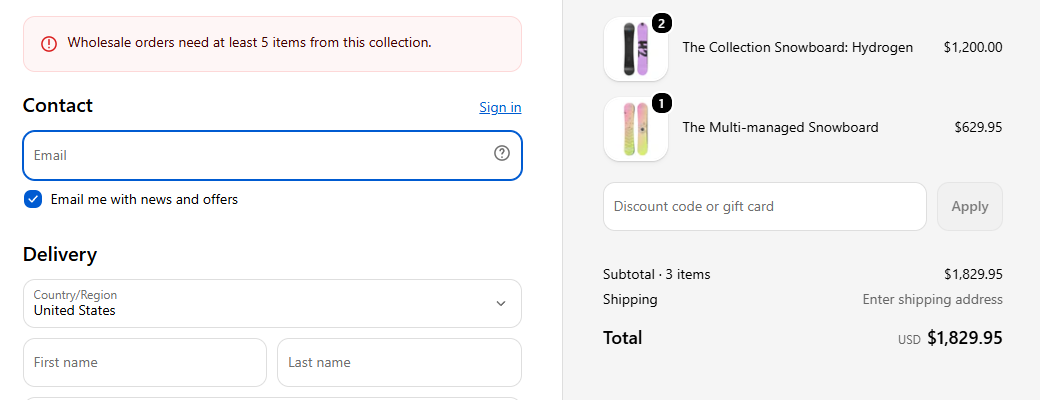
| Checkout validation | Your own Function, or an app | Yes, every path | Your message, inside checkout | Holds |
Why your minimum is getting skipped
If a $20 order just got through your $50 minimum, the fix depends on where that minimum actually lives. There are only three places it can live, and they fail in different ways. Find yours below.
Option 1: shipping rates (native, free, leaky)
The oldest workaround: only offer shipping rates for orders above your minimum.
- In Shopify admin, go to
Settings > Shipping and delivery. - Open your shipping profile and edit the rates for each zone.
- On each rate, add a condition: "Based on order price", minimum equal to your order minimum.
With no rate available under your minimum, checkout shows "no shipping methods available" for small carts. It works, but the failure mode is silent. The shopper sees a confusing shipping error, not "this store has a $50 minimum", and many just leave.
Any rate a small cart still qualifies for. The usual suspects are local delivery and local pickup rates, carrier-calculated rates, or a second shipping profile someone set up for one product. If a $20 order snuck through, check every rate a $20 cart still qualifies for, in every profile, including pickup and delivery.
Option 2: theme edits on the cart page (free, leakier)
Some themes, and a lot of tutorial code, disable the checkout button on the cart page until the cart total clears your minimum. The message is usually something like "add $30 more to reach our $50 minimum".
This only guards one door. Shop Pay, Apple Pay, Google Pay, and PayPal express buttons jump straight from the product page to payment. They never load your cart page, so they never run its code. A shopper can also open checkout directly with a link. If your minimum is a theme edit and orders keep slipping under it, this is why.
The message itself is still worth keeping, because it tells shoppers the rule exists. It just cannot be the enforcement.
Option 3: enforce it at checkout itself
Shopify has a native layer for exactly this: checkout validation, built on what Shopify calls Functions. A validation rule runs inside checkout, server side, on every path into it. The cart page, direct checkout links, and the express wallet buttons all pass through it. There is nothing to skip, because it is not in your theme at all. It works on every Shopify plan, including Basic. It is not Plus-only.
The catch: Shopify gives developers this layer but gives merchants no settings screen for it. Out of the box there is no field where you type a minimum order amount. You either write a Function yourself as custom code, or install an app that manages validation rules for you.
This is the part our app does
Mastiff Order Limits
Order rules enforced at checkout: minimum and maximum order value, minimum and maximum quantity, and sell-in-multiples, all through Shopify's own checkout validation, express wallets included. You set the rule in plain English and test it against any cart in the built-in simulator. What the simulator shows is what checkout enforces. One rule is free forever, which is exactly enough for a single minimum order amount.
Honest limits, whatever you use
- Point of sale (in-person) orders and draft orders you create in admin do not pass through online checkout, so no online minimum, ours included, applies to them.
- A minimum is checked at checkout, not at add-to-cart. Shoppers can build a small cart. They just cannot complete it below the minimum. That is the correct behavior, since they may still be adding items.
Which should you use?
If your minimum exists for shipping economics only, and a confusing "no shipping methods" message for small carts is acceptable, the shipping-rate condition is free and native. Set it carefully across every rate and profile. If you want the minimum stated plainly, enforced on every checkout path including express wallets, and testable before you turn it on, it needs checkout validation, through your own Function or an app like ours.