
How to Limit One Product Per Customer Across Orders (Lifetime Limits) in Shopify
Updated August 2026 · 5 minute read · Applies to every Shopify plan
Shopify's native cart rules and discount codes cannot enforce a true lifetime "one per customer, ever" limit across separate orders. To do that, you need an app that checks a customer's past order history at checkout, not just what is in their current cart.
The options, honestly compared
| Where | Caps one cart or checkout | Caps across separate orders | Automatic, no manual codes | Verdict |
|---|---|---|---|---|
| Discount-code workaround | No | No | No | Friction, not enforcement |
| Cart-level limit app | Yes | No | Yes | Blind to past orders |
| Order-history enforcement at checkout | Yes | Yes | Yes | Holds |
Why Shopify behaves this way
Shopify Functions, the mechanism modern limit and validation apps run on, evaluates the current cart at checkout. It was built to answer questions like "does this cart violate a rule", and a cart, by definition, only contains what the shopper has added right now. It has no built-in memory of what that same customer bought last week or last year. So any app built purely on cart validation, no matter how well it handles quantity limits inside one order, resets to zero the moment a customer starts a new checkout.
This is the exact gap merchants keep running into. They set a "limit 1 per customer", a customer buys one, comes back the next day, opens a fresh cart, and buys another one. The app did its job inside that cart. It just never checked whether the customer already owned one from a prior order.
What each option actually does
Discount-code workaround. The old fix, still floating around in forum threads: create a one-time-use discount code and require it for the item, or set an automatic discount with a usage limit per customer. This can work as a rough deterrent, but it is manual to set up per product, easy for customers to route around with a second email or account, and it is friction rather than enforcement. It also does nothing to stop a guest checking out under a different email.
Cart-level limit apps. Most "limit purchase quantity" apps on the Shopify App Store, including several of the popular ones, only block within a single cart or single checkout session. They are genuinely useful for stopping someone from buying 10 of a capped item in one go, and they are often cheaper or simpler if that is all you need. But they share the same blind spot described above: nothing stops the same customer from placing a second order tomorrow.
Apps that check order history at checkout. The only way to actually enforce "one per customer across all their orders" is for the checkout validation to look up the customer's past orders, not just the cart, before deciding whether to allow the purchase. This is a materially different and more complex build than cart-only validation, which is why it is less common among the apps merchants find first.
Where our app fits
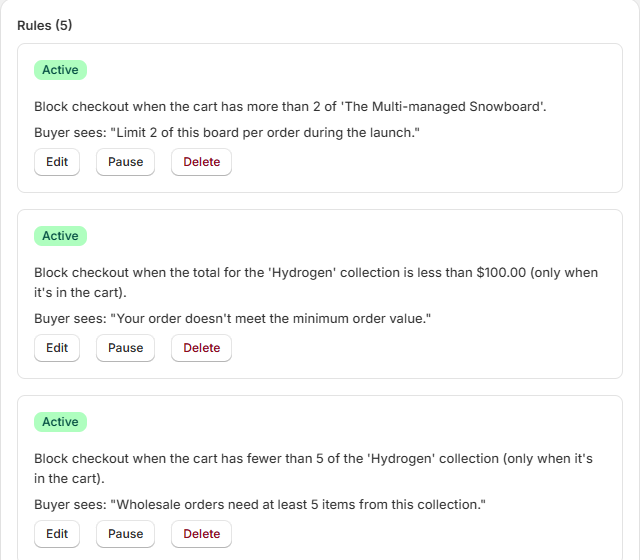
Mastiff Order Limits is built for this specific case. It enforces limits across multiple separate orders using the customer's order history, not just the current cart, and it runs at checkout via Shopify Functions cart validation. It supports per-customer, per-order, per-cart and per-variant limits, plus sell-in-multiples (case pack) rules and minimum and maximum order value rules, so you can combine a lifetime cap on one product with ordinary cart rules elsewhere in the same store.
If your actual problem is "stop the same customer from ever buying more than one of this", this is the layer that solves it. A cart-only app will not, no matter how it is configured.
This is the part our app does
Mastiff Order Limits
Lifetime limits that count a customer's past orders, enforced at checkout through Shopify's own cart validation. Per-customer, per-order, per-cart and per-variant limits, plus sell-in-multiples and order value rules, in one place.
What to know before you set it up
Be honest with yourself about a few limits of this whole category of solution, not just this app:
- Identifying the customer is the whole game. Lifetime enforcement works by matching a customer to their past orders, which depends on having an identifiable customer record, typically a logged-in account or a consistent, identifiable email. A shopper who checks out as a guest with a different email each time is much harder to catch, and no cart-validation app can force someone to use a real, consistent identity.
- This is inventory and allocation control, not fraud prevention. It stops a normal customer from re-ordering an item you have capped. It is not designed to and will not stop a determined bad actor using multiple accounts, multiple emails, or bot tooling. That is a different problem needing different tools.
- Rules apply going forward, not retroactively. When you set a new limit, it governs orders placed after the rule exists. It does not reach back and count purchases a customer made before you created the rule.
If those trade-offs are acceptable, and for most "one per customer, ever" use cases they are, order-history-based enforcement at checkout is the correct mechanism. It is what to look for by name when comparing apps, regardless of which one you choose.